 This blogging business is OK but I'm going to need to keep going to the blog to see if my playmates have shared a pearl of wisdom. I'll not remember to look and I'm going to miss exciting things! Well, no actually. I mean - there will be exciting things but you needn't miss them.
Ignore me if you know this already - but "web feeds" are your new best friends if you want to easily track web content that updates - and blogs are a case in point.
A web feed is a broadcast of what's new on the blog. You can subscribe to the feed and easily see something new has happened when you're using your browser when you're ReadItSwapIt-ing, Amazon-ing, YouTube-ing etc.
There are two feeds for our blog:
In Internet Explorer 7, it's really easy to subscribe to a feed. I don't know much about the other browsers but apparently it should be quite straightforward in recent versions of those and works on similar lines. Click one of the links above, a page will open and (in IE7) you'll get an option to Subscribe to that feed. Click that and you'll then be asked how you want to save it - just like you do for favourites / bookmarks.
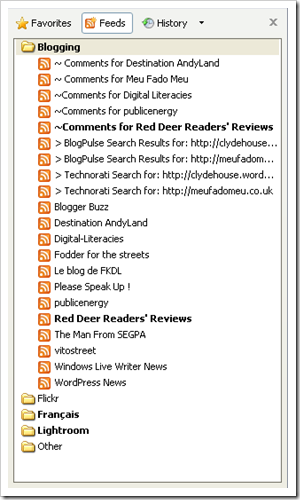
Once you've subscribed you've started building a list of feeds like your favourites / bookmarks list - as in the picture. Feeds with new and updated content show in bold. Once you've read a feed you can mark it as read. When you're looking at a feed you can read the content there or click on a link to see the original post in all its glory.
Newer versions of browsers (like IE7) flag up when feeds of a web page or site are available - look for a button with this logo  and you can start subscribing to web feeds from The Archers to Lolcats.
I think that using feeds gives a blog a chance of being more active - and it makes it less effort. Hope that helps! I like it anyway.

Thanks for this Karl. It's something I've wanted to do for a while, but didn't know how to start it. You are just too computer good!
ReplyDelete